 Future Vanguard Government
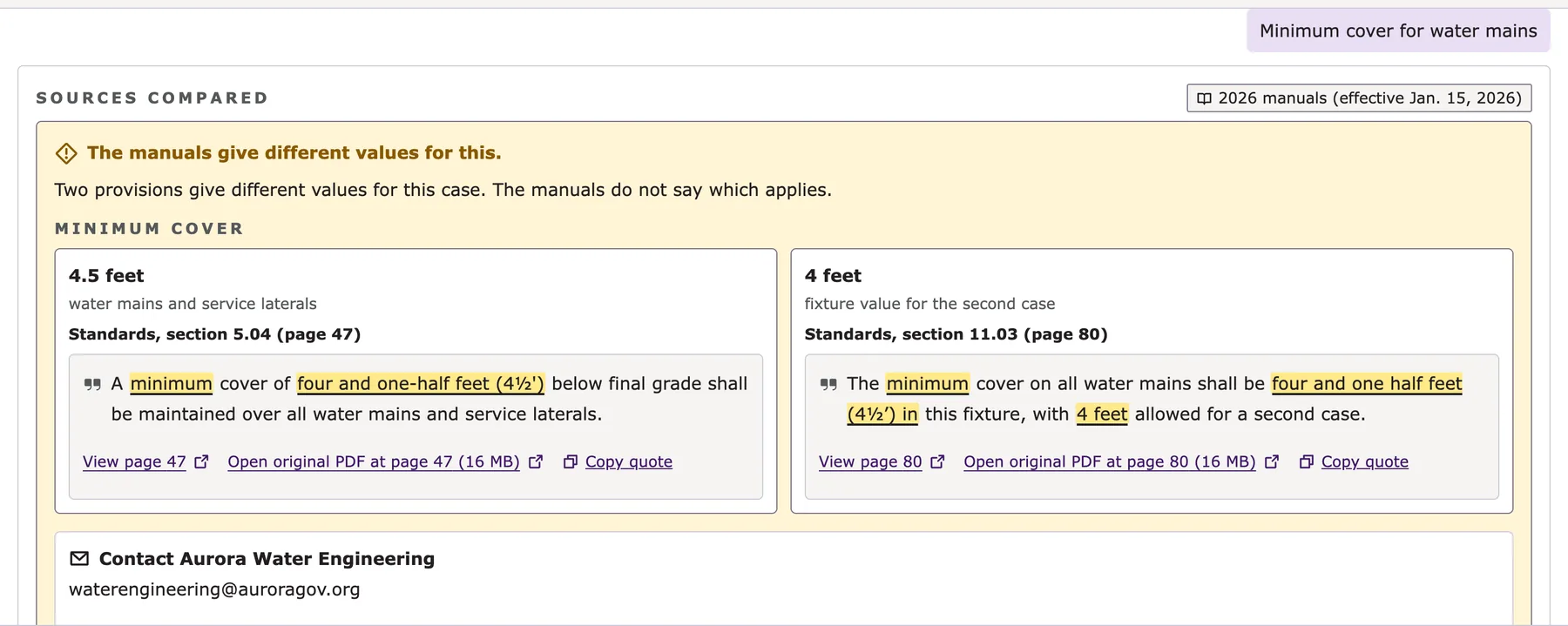
When the manuals disagree, it says so
Two provisions that give different values for the same case are shown side by side, each with its page and quoted passage. Nobody has to find out about the conflict three weeks into construction.
Spec Assistant gives your staff and your public a plain-language answer from the standards, procedures and drawings you already publish, and names the section and page behind it. Where the manuals do not say, it says so and points to a person.
The minimum cover over all water mains is 4½ feet below final grade. 12
Shown as the live demo returned it, on public Aurora Water manuals effective January 15, 2026.
Questions that span two manuals are a built-in sample prompt in the demo. Run it and read the answer and its sources yourself.
Run it in the live demo (opens in a new tab)Conditions and exceptions is another built-in sample category. Run it live and check the cited page.
Run it in the live demo (opens in a new tab)The demo runs on public City of Aurora Water manuals to show what the software does. It is not a City of Aurora service, and Aurora is not our customer.
What Spec Assistant does and how it works: from your manuals to a cited answer, and what your team controls behind it.
So the receipts come with it. Residents, contractors and staff ask in plain words and get the answer, the sources and the original page, in one view.
No codes to remember and no keyword guessing. Sample questions get a new visitor started.
Each answer names where it came from, and the exact excerpt opens beside it with the passage highlighted.
Feedback goes straight to an administrator's review queue. It is how the library gets better.

The live demo as it answered, on public Aurora Water manuals.
The same engine serves the counter, the field and the person who keeps the library current.
Two provisions that give different values for the same case are shown side by side, each with its page and quoted passage. Nobody has to find out about the conflict three weeks into construction.
Standard detail sheets are read as images, so a question about bedding, backfill or a manhole detail is answered from the sheet itself and cited by sheet and page.
One of the sample questions built into the live demo.
A question that spans two documents returns one answer with both sources.
Try it the live demo (opens in a new tab)Conditions and limits that apply to a rule come with the rule, not three pages later.
Try it the live demo (opens in a new tab)If the manuals are silent, it says so and points to the person who can help.
See who keeps it currentAdministrators upload to staging, read a validation report, and a second person approves before anything changes for the public. If something is wrong after launch, one action rolls it back.
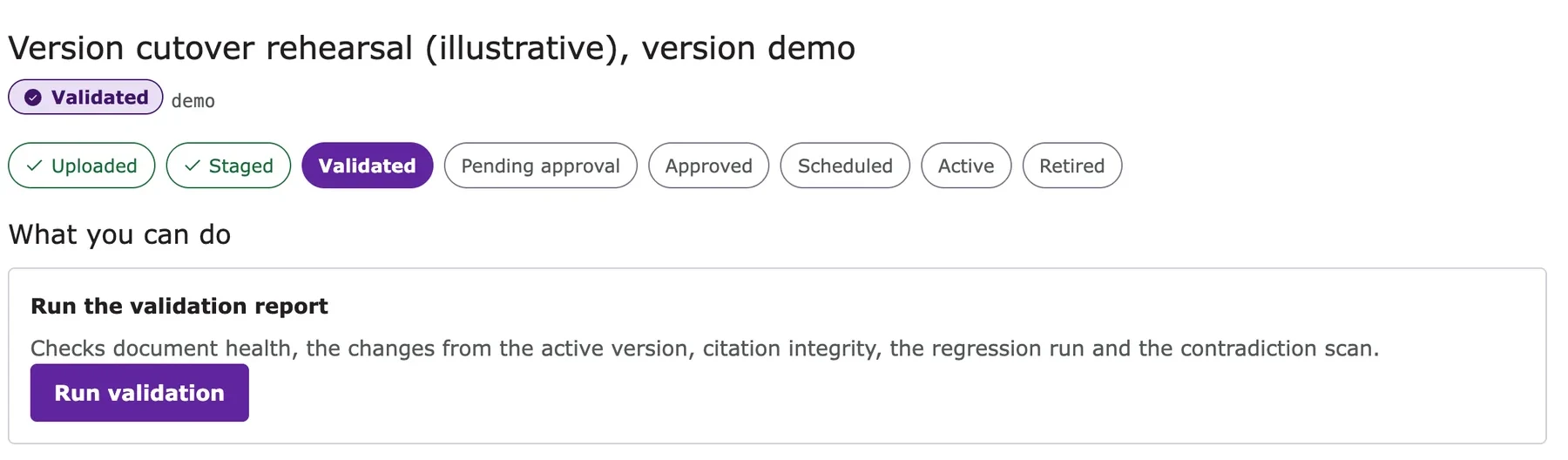
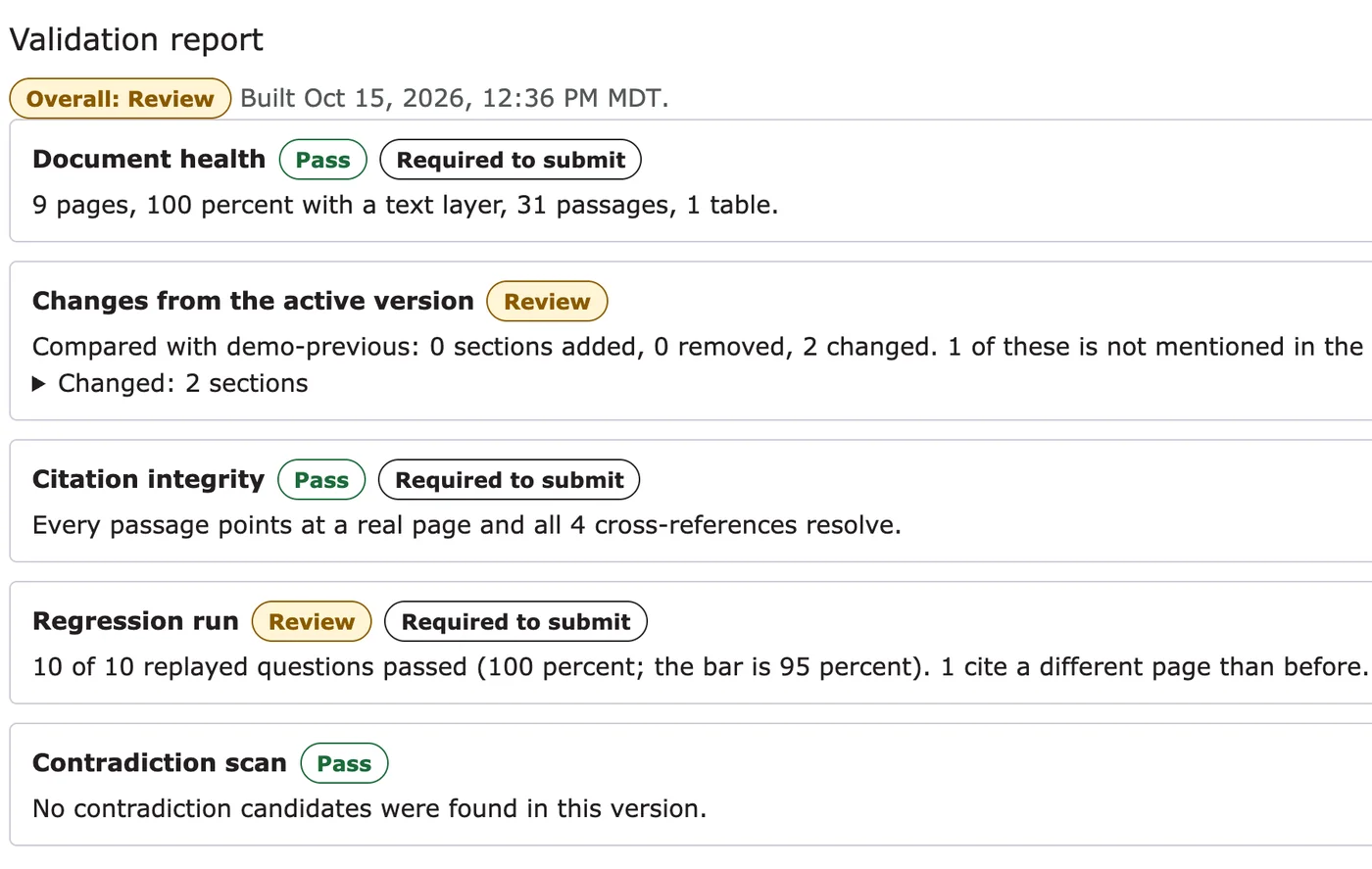
Document health, what changed from the live version, whether every citation still points at a real page, a regression run of replayed questions, and a scan for contradictions.
The person who uploads cannot approve. Editor, approver, analyst and administrator roles are checked on every route.
Return to the previous version immediately, with the reason recorded.
Every action is recorded in a chained log, so a change to history is visible, and exportable.
Every question that ends in a thumbs-down or a referral becomes a review item, not a lost visit.
Wrong citation, missing information, or no answer.
An administrator sees the question, the answer given and the sources.
An approved answer or a library update, never a silent change inside a model.
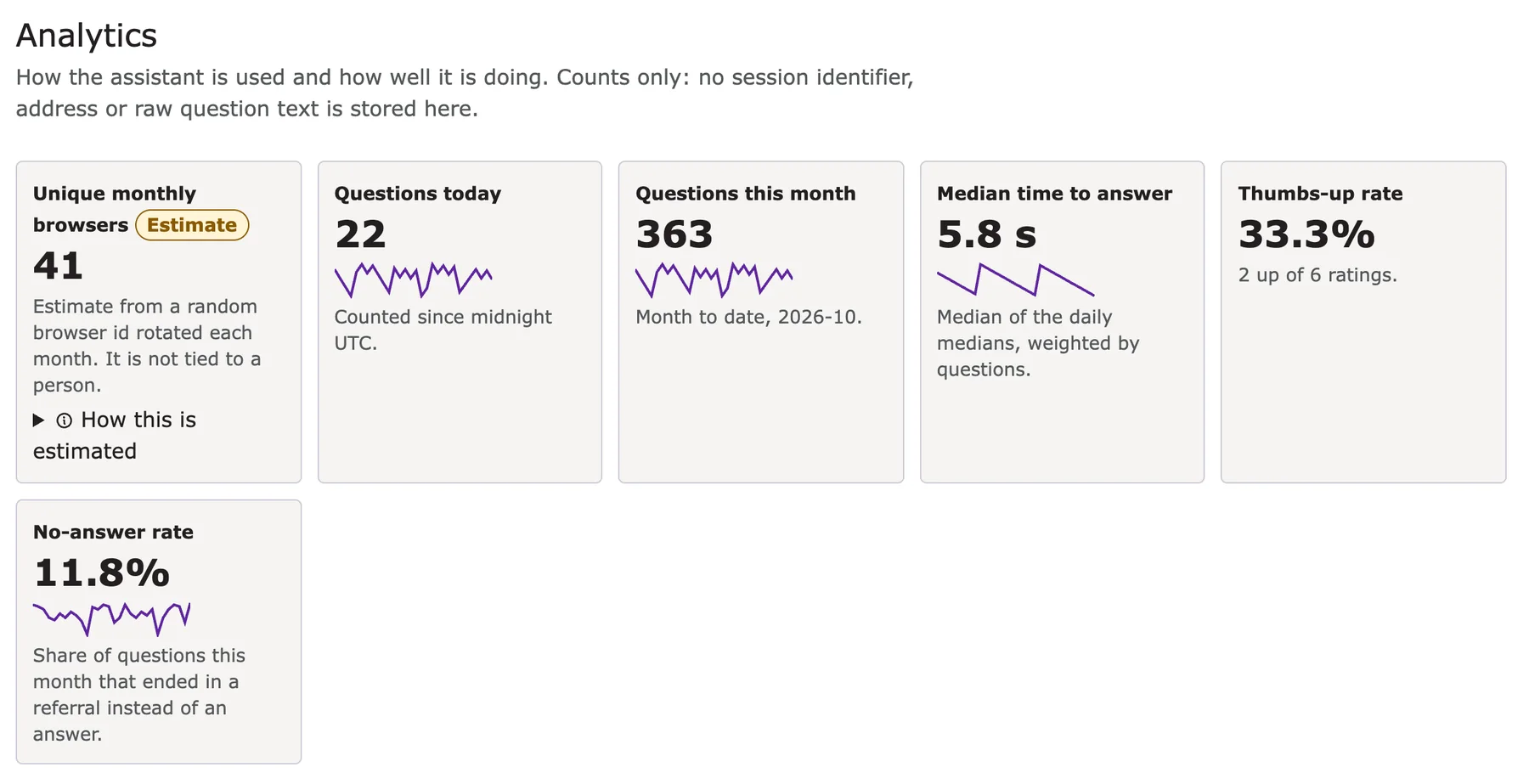
Most-asked questions, no-answer rate, satisfaction and cost per question, with CSV and JSON exports for Power BI.
No shared multi-customer platform. We build it inside the Azure subscription you control, and you pay Azure consumption directly under your own agreement.
East US 2 primary, Central US paired. Services reach each other over private endpoints with managed identity, and public access to them is turned off.
The subscription, the keys and the documents are yours. Data stays in the U.S. Data Zone, and no third-party analytics are loaded.
Administrators sign in through your Okta. Roles are enforced again on the server for every request, and access ends when your directory says it does.
Embed the chat on your existing site with one snippet. Nothing to install on your side.
<iframe src="https://assistant.your-domain.gov/embed"
  title="Ask the manuals" width="100%" height="720"></iframe>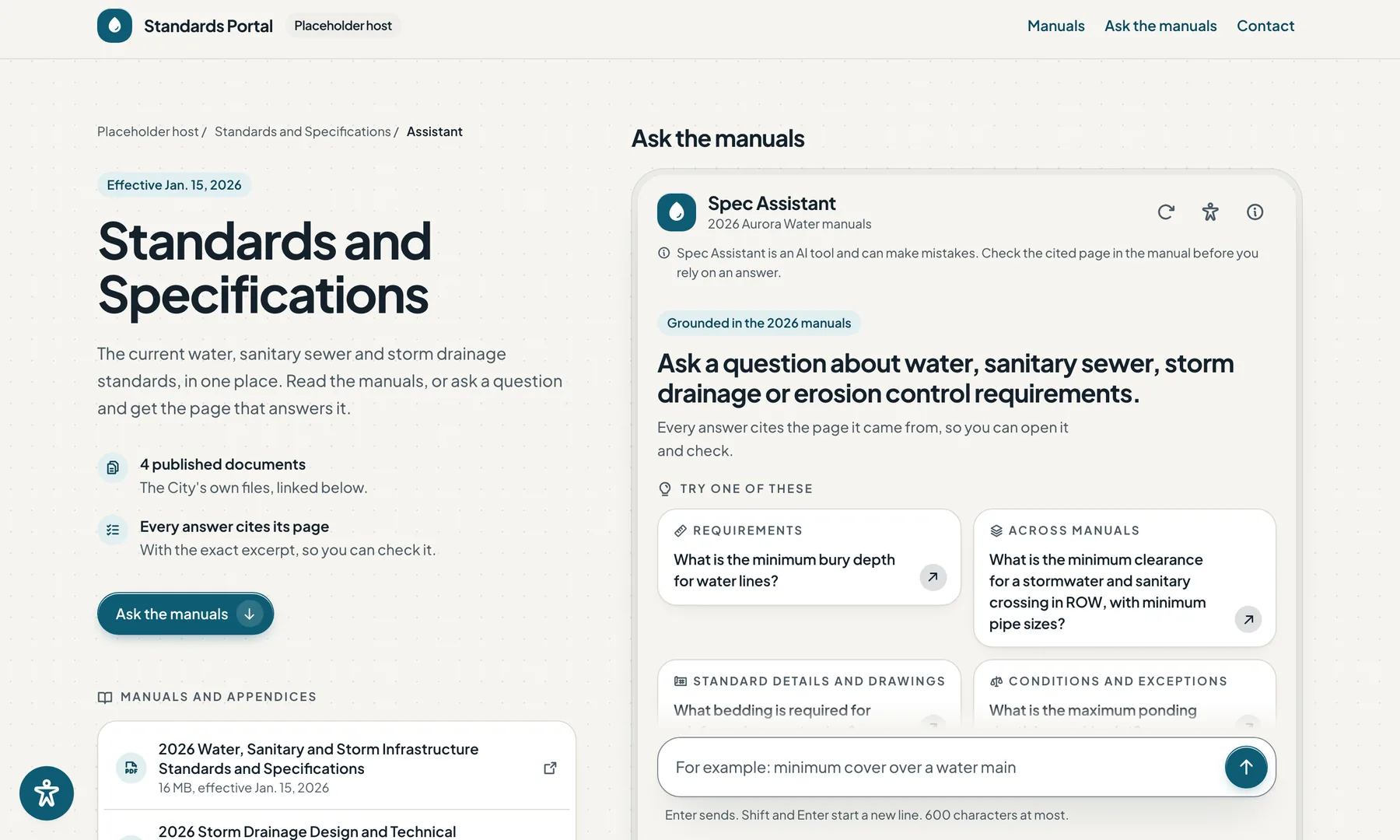
We build to the frameworks your reviewers use, on infrastructure they already trust, and we test what we claim.
Deployed in your own tenant, with controls aligned with NIST SP 800-53, the FedRAMP baseline.
Each visitor gets a random session token. No endpoint lists sessions, and nothing carries across them.
Editor, approver, analyst and administrator roles are checked on every administrator route.
Files with scripts, embedded files, encryption or malformed structure are refused with a readable reason.
Two-person approval, one-action rollback and a chained audit log.
Rate limits, a per-session question cap and a daily ceiling that falls back to search-only.
Citations are built by the program from the retrieved passages, never typed by the model.
From our own test run on October 15, 2026, against the live demonstration build. The full test record is available on request.
Authorization checks behaved as expected. Five kinds of caller tried 56 administrator routes.
Session-isolation probes found no leak. Token guessing, token changes, parallel sessions and history were all tried.
Hostile PDF types refused at upload. Scripts, launch actions, embedded files, encrypted, malformed, wrong type and decompression bombs.
A typical engagement. We confirm the dates with you at kickoff.
Scope, documents, named contacts and access requests. We agree what a good answer looks like using your own sample questions.
We build the landing zone in your Azure subscription, connect Okta SAML and set up staging and production.
Manuals and drawings are ingested and validated. Your test set runs through the same checks an approver will see.
Your staff use it for real. Administrators are trained on upload, approval, rollback and the review queue.
The embed goes on your site. Support and monthly reporting continue after launch.
An answer without a source is not an answer. If the manuals do not support one, the assistant says so and points to a person.
Staff approve new documents and resolve flagged answers. The software does the reading; people keep the judgment.
We do not fine-tune models on your documents. Corrections are reviewable changes to the library.
Accessibility is tested screen by screen at desktop and phone width, with keyboard and high-contrast passes.
Pick a manual, standard or procedure you already publish. We load it, and show you the assistant answering your own questions from it, with the page cited. No cost, no commitment.
Anything already on your website.
Indexed page by page, drawings included.
And check every cited page yourself.
Start with the live demo, then tell us about your documents.